How I automated bank transaction logging with Apple Shortcuts and local LLM

Hello hello, it’s been a while since my last blog post, and here we are with another one. This post is about a small project I’ve been working on that I found quite useful (for myself).
The Problem: No Bank APIs and Zero Discipline
Recently, I’ve been self-hosting Sure which is an open-source personal finance tracker on my laptop to manage my spending and investments (into scam coins). I ran into a problem syncing online transactions because Vietnamese banks don’t have APIs for personal use. As a result, I have to manually submit each transaction into my Sure instance when I get home. Logging 5 or 6 transactions daily is not exactly a big problem for a person with discipline, but I have none myself, so it is a big problem. Thus, laziness inspired some innovation.
Why Existing Workarounds Didn’t Work
There were some solutions on the internet like using an Apple Pay Shortcut trigger to automatically log expenses into a mobile app, or creating a Telegram bot where you can send a message about the transaction itself. The first one only works with credit cards, so it’s not really ideal since we use mobile banking a lot more in Vietnam. The second is feasible, but then it just shifts from me inputting manually on the laptop to doing the same thing on my phone. Not to mention, so many other apps require a monthly subscription just to sync bank transactions.
The Turning Point: iOS 27 Notification Automations
And then, iOS 27 came and dropped the most impactful Automation I have ever seen in the history of Apple Shortcuts: Notifications. I almost fainted and dropped my phone when I saw this in my Shortcuts app. My girlfriend had to check on me (this is real and not because she insisted on being mentioned in this blog by any means). Anyhow, this means that Shortcuts now allows you to run a workflow whenever a notification is received from a specific app on your phone.
The neat part is that you can also filter the notification type directly inside the automation (for example, filtering by matching keywords like account changes, so random bank promos, loan ads, or OTPs don’t trigger anything).
Here is how it is configured in the Shortcuts app:
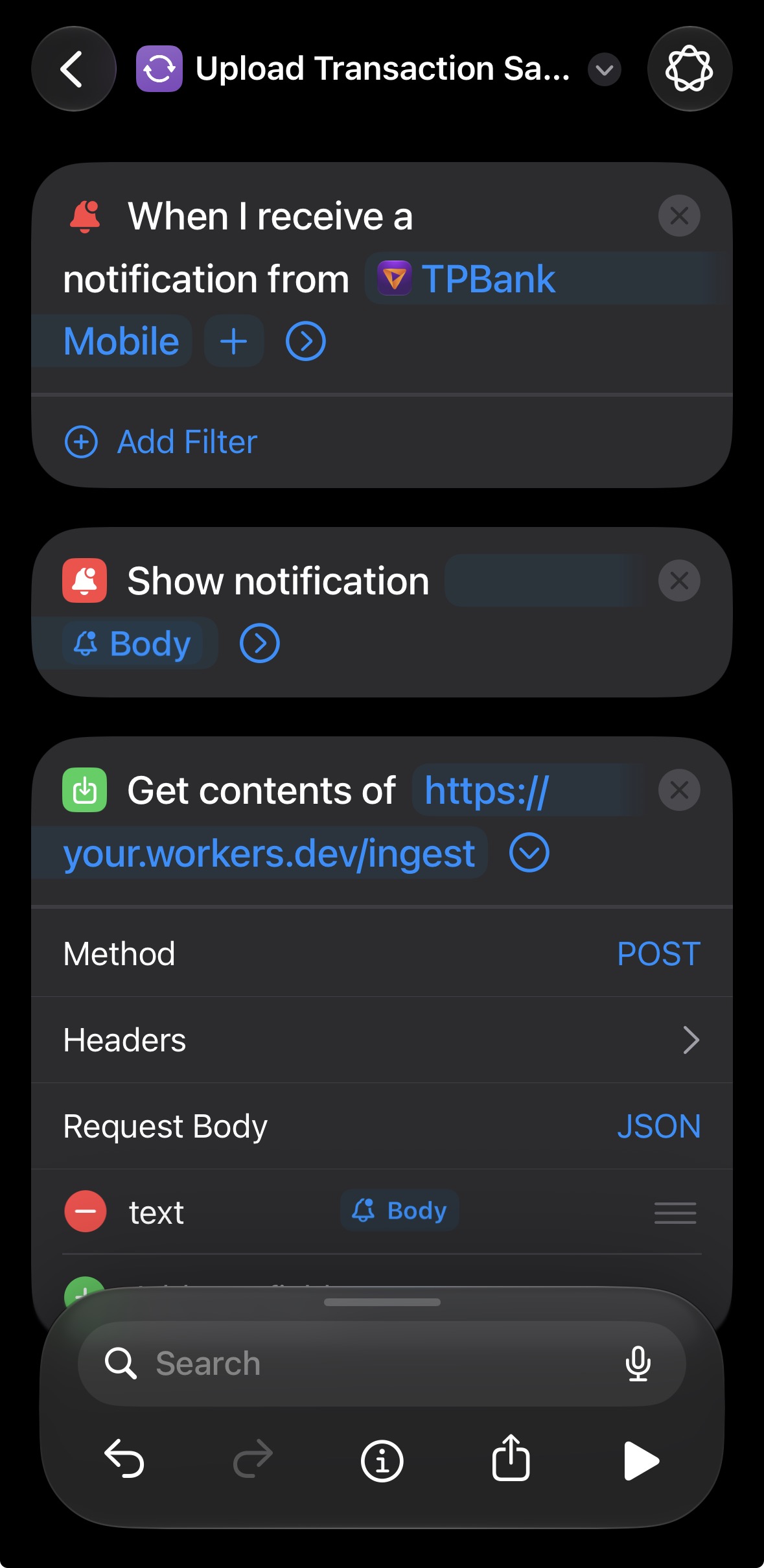 Configuring the Notification trigger, visual alert, and POST request in Apple Shortcuts
Once a matching transaction notification hits the phone, the shortcut executes:
- It first pops a quick notification banner on the phone to let me know it’s doing its magic.
- Then it grabs the notification body and sends a
POSTrequest with the raw text as JSON to my Cloudflare Worker endpoint.
Here is what it looks like in action on the phone right after a transaction happens:
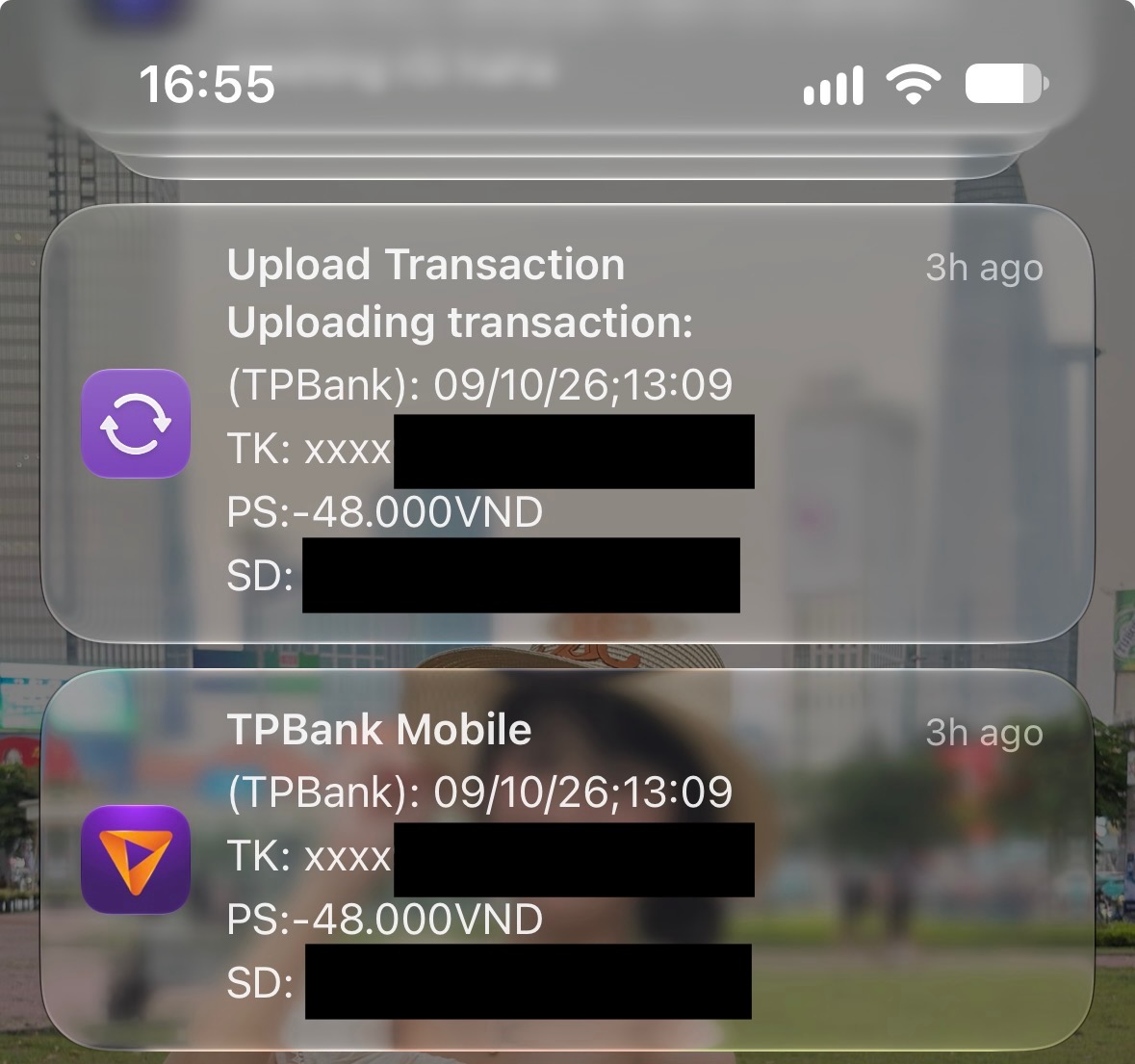 The automation in action: firing an upload confirmation banner right over the bank notification
Stashing Notifications with Cloudflare Worker + D1
With the most important part done, the rest is just a matter of how I should (temporarily) store this notification and sync it back to my Sure instance on the laptop. For temp storage, I tried not to overthink things and went with the Cloudflare Worker + D1 database combo. Their free tier is generous for personal use, the API is well documented, and data is encrypted at rest too. There are other good options out there like AWS or GCP free tiers, but they require a lot more setup and make it a bit too easy to accidentally incur unexpected charges.
The Worker itself is pretty lightweight: it receives {"text": "..."}, hashes the message to deduplicate any retries or repeated bank alerts, and inserts it into D1 with synced = 0. For security, the Shortcut sends a simple Bearer token in the header to authenticate against the Worker. Right now, the token is just stored directly inside the Shortcut itself. It will definitely need some security improvements in the future, but for a personal pet project, it gets the job done for now.
Parsing Bank Notifications with a Local MLX LLM
For syncing, I needed a parser that reads generic bank notifications and renders them into a JSON object that follows Sure’s format. To tie this together, I built a local CLI tool called ensure. I’ve been wanting to use a local LLM for some time now and felt like this was the right use case for it. I have a MacBook Air M5 (16GB), which isn’t a crazy spec, but it can run a small model just fine. I went with mlx-lm because the performance on a Mac is ridiculously good, since it is literally made by Apple for Apple Silicon. After some quick searching and testing, I chose the Qwen3-4B-Instruct-2507-4bit model. I’m still new to local LLMs, so this choice was purely based on vibes.
Running the model locally is also a big plus for privacy: bank notifications already mask account numbers anyway, D1 only serves as an ephemeral queue, and zero financial data leaves my laptop to third-party cloud LLMs.
Whenever I’m back on the laptop, I just run ensure --sync-transactions. To make sure the LLM doesn’t invent random categories, the CLI caches my Sure categories and past transactions locally (ensure --cache-history). The prompt provides hints for extraction: where to look for the amount, detecting expense vs income (like PS:- vs PS:+), and mapping the merchant to my existing categories so Sure’s internal UUIDs are resolved accurately.
Under the hood, the script outputs both a clean, human-readable version from the LLM and the final generated API payload with Sure’s resolved UUIDs.
Here is what the extraction looks like in practice:
Raw bank notification:
1
2
3
4
5
6
7
(MBBank): 22/09/26;19:55
TK: xxxx0000000
PS: -65.000VND
SD: 800.000VND
SD KHA DUNG: 800.000VND
ND: HIGHLANDS COFFEE LE LOI - Thanh toan tien cafe
SO GD: 123x
Parsed by LLM:
1
2
3
4
5
6
7
8
9
{
  "account": "MBBank",
  "amount": 65000,
  "name": "Highlands Coffee",
  "currency": "VND",
  "date": "2026-09-22",
  "category": "Drinks",
  "nature": "expense"
}
Generated API Payload:
1
2
3
4
5
6
7
8
9
10
11
12
13
14
15
16
{
  "transaction": {
    "account_id": "81cb8465-1cad-47d5-8061-b8e4baa954db",
    "date": "2026-09-22",
    "amount": 65000,
    "name": "Highlands Coffee",
    "description": "HIGHLANDS COFFEE LE LOI - Thanh toan tien cafe",
    "notes": "",
    "currency": "VND",
    "category_id": "1e92b549-69f5-4e19-8f14-f27059612548",
    "nature": "expense",
    "merchant_id": null,
    "tag_ids": [],
    "user_modified": true
  }
}
Putting It All Together
Just like that, we have the entire automation flow:
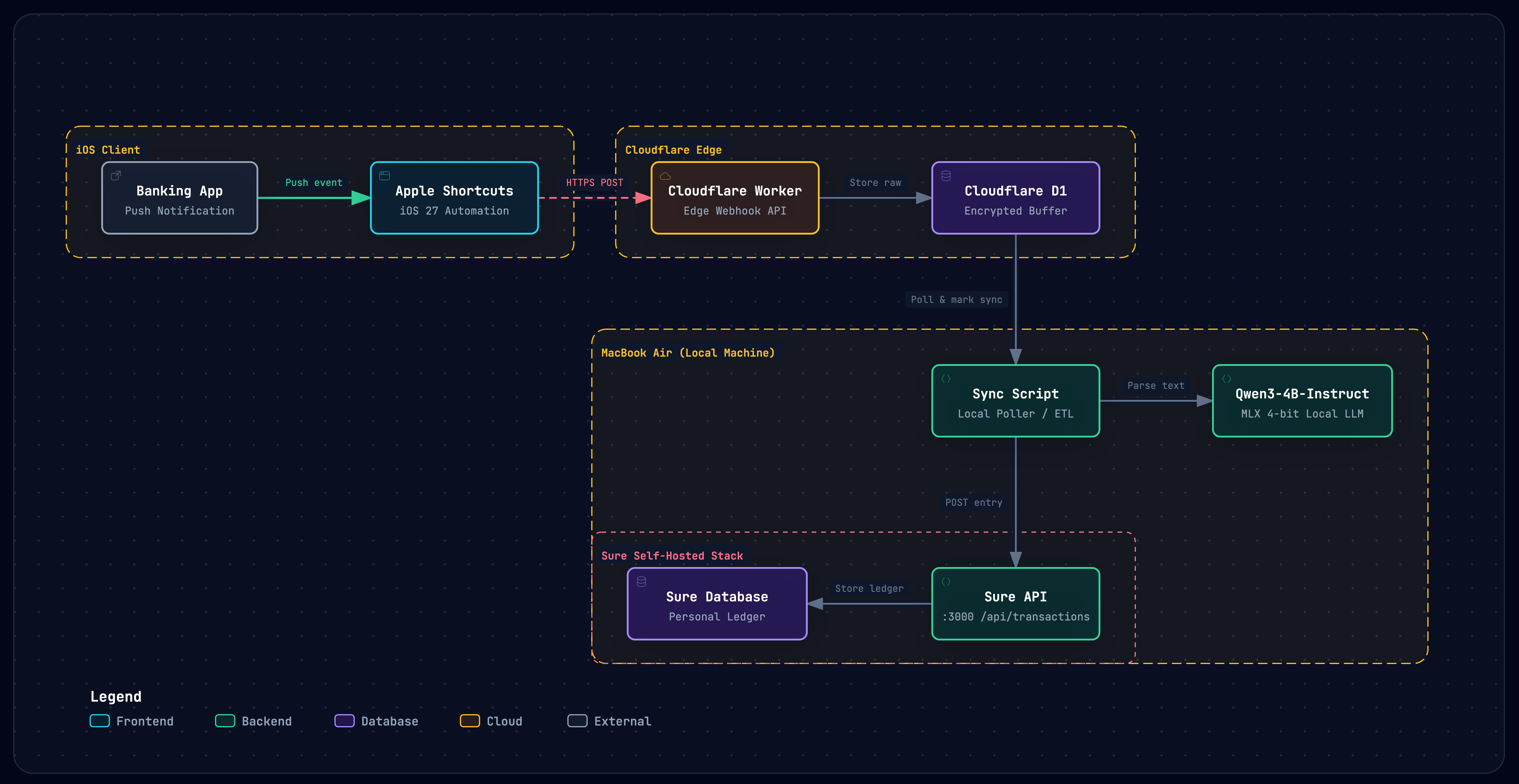
- Bank notification arrives on iOS.
- Apple Shortcut triggers, pops a notification banner, and POSTs the raw payload to Cloudflare Worker.
- Cloudflare Worker hashes the text for deduplication and stores it temporarily in Cloudflare D1.
- Back home, local sync script (
ensure --sync-transactions) pulls un-synced items and runs on-device inference usingmlx-lm. - Formatted transaction is POSTed to Sure with resolved categories and UUIDs.
- Cloudflare Worker marks the records as synced, and auto-purges them after 14 days.
This is no revolutionary project, but it’s one that I know can help people like me who want to keep track of their transactions more accurately.
If you want to poke around the code, grab the setup, or adapt the extraction prompts for your own bank, you can find the full repository on GitHub: github.com/thu4n/ensure.